Free photo booth strip maker
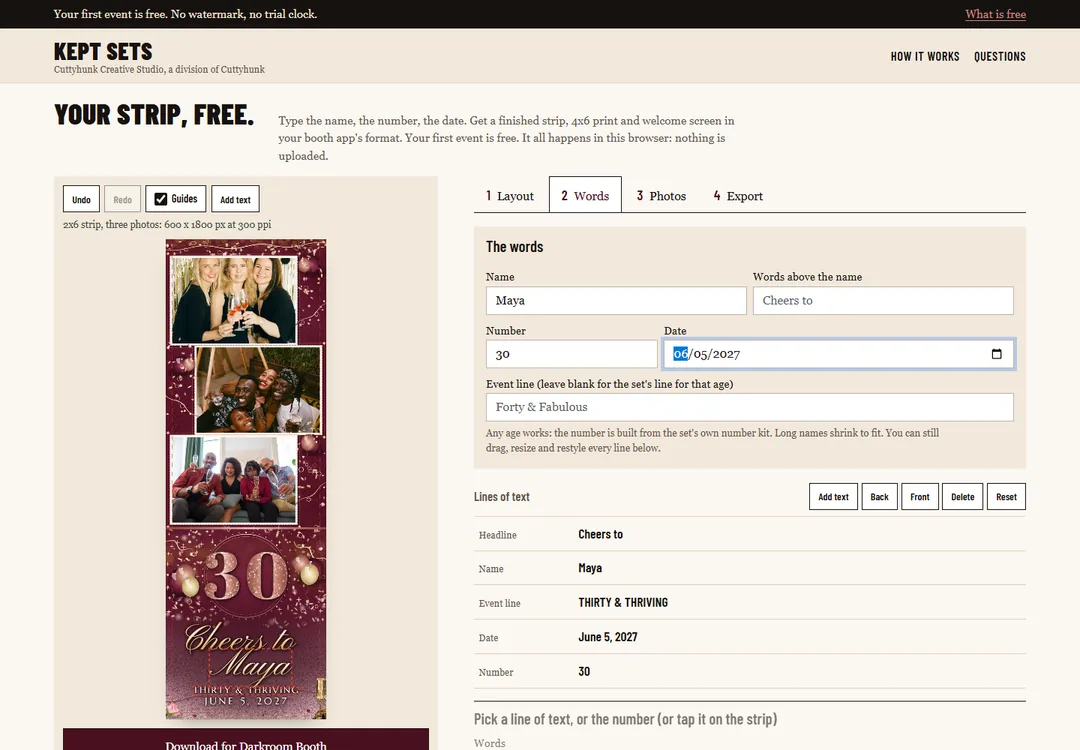
Your Strip, Free is a free photo booth strip maker for booth owners and party hosts: type a name, a number and a date, and download a finished 2x6 strip, a 4x6 print and a welcome screen as files for your booth app. Your first event is free, with no watermark.
It runs in your browser. Pick a layout, type your words, pick your booth app, download the zip.
What it makes
| Layout | Pixels | In the zip |
|---|---|---|
| 2x6 strip, three photos | 600 x 1800 | Overlay PNG, background PNG, layered PSD |
| 4x6 print, landscape | 1800 x 1200 | Overlay PNG, background PNG, layered PSD |
| Welcome screen | 1920 x 1080 | Overlay PNG, background PNG, layered PSD |
The photo windows are clear on purpose. Your booth drops your guests' photos in at the event, so what you download is the finished frame around them. See photo booth template sizes for why those pixel counts are what booth apps expect.
How it works
- Pick a layout: the strip, the 4x6 print or the welcome screen.
- Type the name, the words above it, a number and the date. Leave the event line blank and the set fills in a line that fits the age. Long names shrink to fit.
- Add your email, tick the consent box, and pick your booth app.
- Confirm your email with the link we send, then download the zip. Other layouts and other booth apps for the same event are free to download again.
What is in the download
- An overlay PNG with clear photo windows, to go on top of the photos.
- A background PNG, to go behind them.
- A layered PSD with live type, and the number as its own layer.
- A three-step guide for the booth app you picked.
- The fonts, with their licenses.
- A design file that reopens your design on this page.
It builds files for nine apps. Step-by-step help is on its own page for five of them: dslrBooth, LumaBooth, Darkroom Booth, Snappic and Breeze Booth. Photoboof, Social Booth and Simple Booth are included but still being tested, and Photoshop opens the layered PSD.
We test the download before it ships: file sizes, clear photo windows and the layered PSD are checked by script.
What is free, and what is not
Your first event is free. The date and the age define the event, so fixing a name or the wording is free, and so is downloading another layout or another booth app for the same event. A different date or a different age is a different event and needs a set: $9 for one event, or $19 for a booth business that uses it at every event. The look open today is Rose Gold Forty, and the number can be any age.
There is no watermark and no trial clock. We ask for an email address to send the files and a confirmation link, and we keep it to send occasional news. Every email has an unsubscribe link.
What it is not
It does not take your own photos, and it is not a way to turn a few pictures into a keepsake strip at home. It makes the finished frame for a photo booth, and the booth supplies the photos at the party.
Questions
- Is Your Strip, Free really free?
- Yes, for your first event. The date and the age define the event, so fixing a name or the wording stays free. A different date or age needs a set, which is $9 for one event or $19 for a booth business. There is no watermark and no trial clock.
- Can I put my own photos in the strip?
- No. The photo windows are clear, and your booth drops your guests' photos in at the event. Your Strip, Free makes the finished frame, not a collage from pictures you upload.
- Which booth apps does it make files for?
- Nine: Darkroom, dslrBooth, LumaBooth, Snappic, Breeze, Photoboof, Social Booth, Simple Booth and Photoshop. Photoboof, Social Booth and Simple Booth are still being tested. You pick the app before you download, and the zip includes a three-step guide for it.
- What do I get in the download?
- A zip with an overlay PNG with clear photo windows, a background PNG, a layered PSD with live type and the number as its own layer, a three-step guide for your app, the fonts with their licenses, and a design file that reopens your design on the page.
- Do I need Photoshop?
- No. The PNGs are finished and load straight into your booth app. The layered PSD is in the zip if you want to change the type yourself later.
- Why does it ask for my email?
- We send a link to confirm your address, which also keeps it to one free event per address. The strip is built in your browser, so no files are emailed. We receive your email, a random ID for this browser and a code made from the date and age, never the names or wording you type. If you agree to news, every newsletter has an unsubscribe link.